Already have a play designer? Find out if your plays work.
Keep drawing plays wherever you do now: an app, a notebook, a whiteboard. Upload a screenshot or photo of a play, or your whole playbook as a PDF, and Open Grass runs it against Cover 1, Cover 2, Cover 3, Cover 4 and man, then tells you plainly whether it works and how to fix it.
Free while in beta. Works in any browser on a phone, tablet or computer.
Your play designer draws it. Open Grass tests it.
Play designer apps are great at drawing routes, building a playbook and printing wristbands. Keep using yours. What a drawing can’t tell you is whether the play will work, because the defense on the page never moves.
Open Grass does just that one job. Bring a play you already have, put the defense you expect on it, and get simple, direct feedback: a grade, who’s open, and what to change.
How it works
Bring your play
Upload a screenshot from your play app, a photo of a play card or whiteboard, or your whole playbook as a PDF. Or just describe it (“twins right, corner over a flat, slant on the backside”). Open Grass puts it on the field as a draft you can check.
Put a defense on it
Drag Cover 1, 2, 3, 4 or man onto the field, add a blitz, or move single defenders to match the team you play Saturday.
Get a straight answer
Watch the play run with defenders that react. Open Grass grades it A–F against each coverage, ranks your quarterback’s reads, and suggests route changes you can try with one tap.
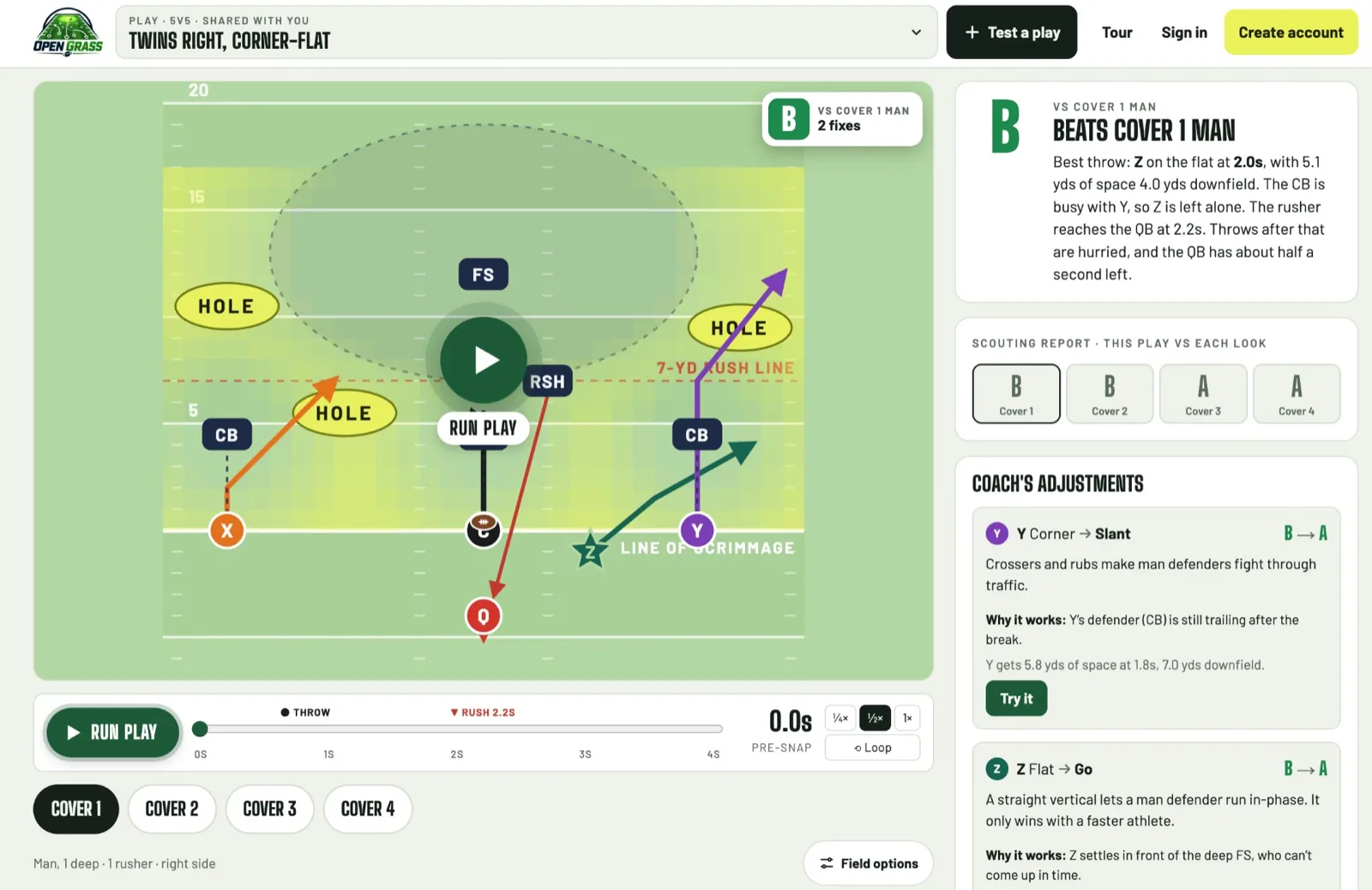
Example: Twins Right, Corner-Flat
Two receivers to the right run a corner and a flat. One defender can’t cover both, so against zone the quarterback reads that defender and throws to whichever receiver that defender leaves. On the backside, a slant gives the quarterback a quick answer.
It works against everything, and best against Cover 3 and Cover 4, where the backside slant finds open grass. Man is the tightest look: the corner’s defender runs with him, so the quarterback’s best throw is the flat. Open Grass suggests turning the corner into a slant that cuts back inside across the flat, so its defender is still trailing after the break. That one change raises the grade against Cover 1 Man from a B to an A, and against Cover 2 from a B to an A.
New to route names? See the flag football route tree.
What you get for each play
- An A–F grade against every coverage in one scouting report, so you know which looks the play beats.
- A heatmap of the open grass before the snap and while the play runs, so you see why a route is open.
- Your quarterback’s read order for each coverage: who’s open, who’s tight, who’s covered, and when.
- Route fixes you can try with one tap, each showing how much it raises the grade.
- Runs and trick plays too: handoffs, pitches and throws by the ball carrier are graded with defenders in pursuit.
Questions
Do I have to redraw my playbook?
No. Upload your playbook as a PDF (free account) and Open Grass reads every play diagram in it, page by page, and saves each one for you to test. Or upload a screenshot or photo of each play. You can also describe a play in your own words, or import an Open Grass playbook file.
Which play designer apps does it work with?
Any of them. Open Grass reads the picture of the play, not the app’s file, so a screenshot from any app works, and so does a PDF it exports, a photo of a hand-drawn play card or a whiteboard.
Is Open Grass a play designer?
No. Keep the app you already use for drawing plays, printing wristbands and sharing with your team. Open Grass does one job: testing your plays against a defense and telling you how to make them better.
Is it free?
Yes, while Open Grass is in beta. Your first AI draft is free without an account; a free account gives you more drafts and saves your plays, favorites and share links. Early coaches get founding-coach perks.
Does it work for 7-on-7?
Yes. Open Grass tests 5-on-5 and 7-on-7 flag football plays. A 7-on-7 play gets a wider field, seven defenders and the coverages you’ll see in that format, including Cover 2 Pressure and 2-Man Under.
Are my plays private?
Yes. Plays you save stay in your browser, or in your private account when you’re signed in. A play is shared only when you send someone a share link. See the privacy policy for the details.